
Sharp 3D: Camera Control for AI-Generated Images
A Filmmaker's Approach to Camera Control in Gen-AI
The generative AI space has exploded with incredible tools for creating images and video from text prompts. Yet there's a fundamental disconnect between how these tools are designed and how filmmakers actually work. AI generation has largely been approached from a technology perspective (what's computationally possible) rather than from a filmmaking perspective (what's creatively intuitive).
Case in point: watch a Director or Director of Photography operate a camera on set. The precise framing of a shot, the subtle adjustment of angle, the careful positioning of the lens. This is the fundamental language of visual storytelling. A DP might spend significant time finding exactly the right angle, adjusting height by inches, tilting the camera a few degrees. This level of camera control is simply impossible with current generative AI tools.
The Problem with Current Camera Angle Controls
Some platforms have recognized this gap. Freepik, for example, introduced a camera angle control where you can reposition using a 3D cube widget. It's an interesting approach. You drag a cube to set your desired camera angle before generation.
But here's the issue: it's incredibly unintuitive. Rotating a cube widget and mentally translating that to what a camera will see is a cognitive leap that doesn't map to how cinematographers think. When a DP frames a shot, they're looking through the camera, moving in real space, seeing the actual composition change in real-time. Not manipulating an abstract geometric proxy.
With this in mind, I set out to explore a better solution.
Apple Sharp: 3D Gaussian Splatting from a Single Image
Apple's recently released Sharp ML model caught my attention. Sharp generates 3D Gaussian Splats from a single image input, meaning you can take any 2D image and create a navigable 3D scene from it. Qualitative Examples Page
This opens up a fascinating workflow possibility:
- Generate or select a base image
- Convert it to a 3D Gaussian Splat using Sharp
- Navigate the 3D scene with intuitive camera controls
- Capture a new perspective as output
- Re-render this new angle using a generative model to fill in details
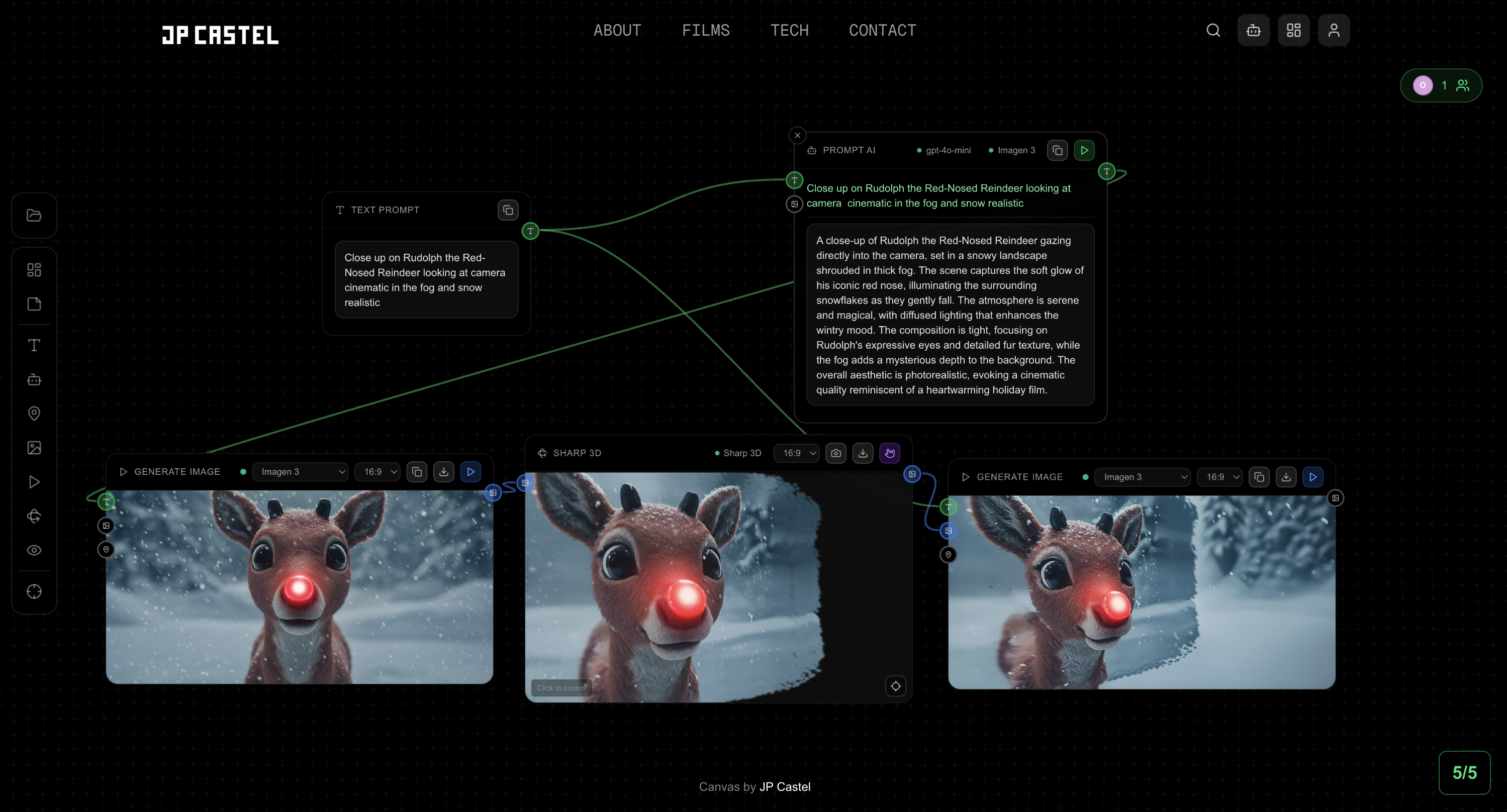
This approach brings real camera operation into the AI generation workflow. You're not manipulating abstract controls. You're operating a camera in a 3D representation of your scene.
Building the Foundation: Collaborative Canvas
To make all this Sharp 3D experimentation possible, I first needed to build a sandbox environment. A node-based canvas where different components could be connected and tested together.
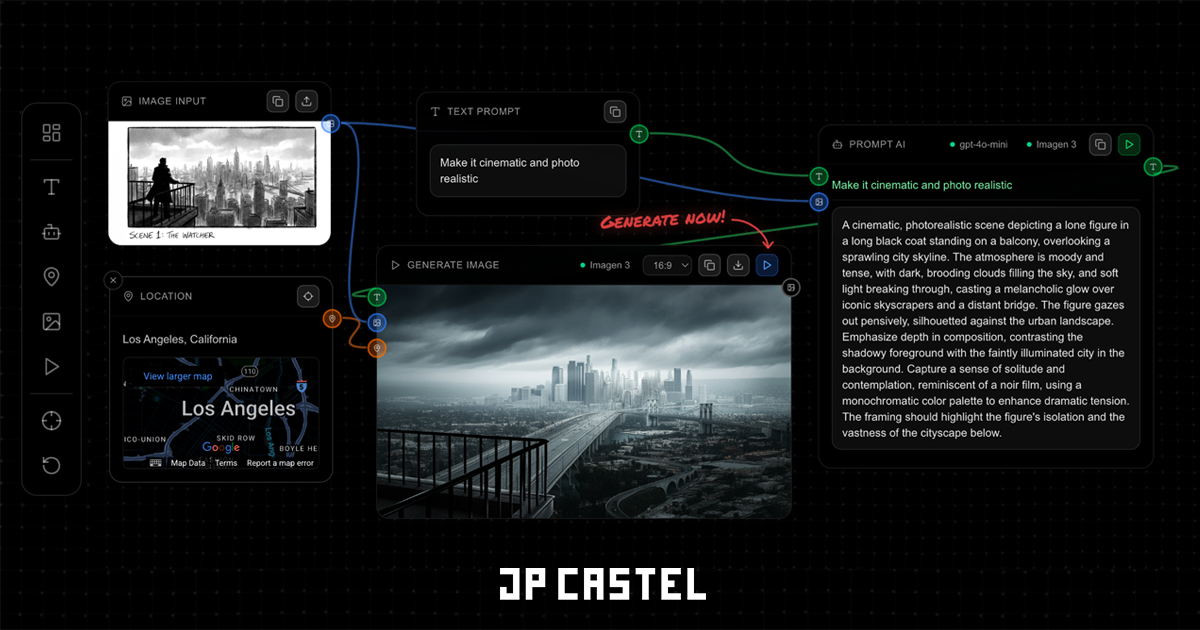
This collaborative canvas uses Yjs for CRDT-based real-time synchronization and Hocuspocus as the WebSocket backend. Multiple users can work on the same canvas simultaneously, seeing each other's cursors and changes in real-time.
The design standardizes routes between nodes:
- Image outputs can connect to image inputs
- Text outputs can connect to prompt inputs
- Camera state can be synced between viewers
Building the Sharp 3D Node
Building on top of this node-based sandbox, the Sharp 3D Node required several technical challenges to be solved:
- Local Model Deployment - Running Apple's Sharp model on my RTX 3090
- The Wild West of APIs - Navigating the chaos of image generation models
- Gaussian Splat Renderer - Building a lightweight browser-based viewer
- Real-Time Preview Output - Continuous frame capture for downstream nodes
Local Deployment with RTX 3090
The Sharp model needed to run on my LA server, which hosts an RTX 3090 (24GB VRAM) in an LXC container via Proxmox. The GPU is passed through to the container using Proxmox's vGPU passthrough, allowing multiple services to share the same physical GPU.
I built a dedicated FastAPI container using the nvidia/cuda:12.1.0-runtime-ubuntu22.04 base image. This runtime image keeps the container lightweight since we don't need CUDA compilation. The Sharp model itself is installed directly from Apple's GitHub repository:
FROM nvidia/cuda:12.1.0-runtime-ubuntu22.04

# Install Sharp from Apple's GitHub
RUN pip install --no-cache-dir git+https://github.com/apple/ml-sharp.git
The API accepts a base64-encoded image, runs the Sharp CLI for prediction, and returns both the generated PLY file and a particle preview render. The particle preview is generated server-side by projecting the Gaussian splat point cloud onto a 2D image, giving immediate visual feedback before the full 3D scene loads in the browser.
# Run Sharp prediction using CLI
result = subprocess.run([
    "sharp", "predict",
    "-i", input_path,
    "-o", tmp_output_dir,
    "-c", SHARP_CHECKPOINT_PATH
], capture_output=True, text=True, timeout=300)
Because multiple GPU services share the same 3090, the API includes cross-service VRAM coordination. Before running Sharp, it sends a /clear-vram request to the Image Gen API (running on the same GPU) to release any cached models. This prevents CUDA out-of-memory errors when switching between services.
The Wild West of Image Gen APIs
Experimenting with different models and API routes has been... educational. The landscape is genuinely chaotic.
Model Exploration:
- Imagen 3 RAW vs STYLE vs Reference modes: Each requires different API configurations, different prompt structures, and produces different results
- Qwen Image Edit 2511: Promising model for image editing, but deployment on my RTX 3090 (24GB VRAM) is challenging without using ComfyUI's GGUF quantized versions
- Z-Image: Tried deploying locally but discovered it doesn't even support image input. Text-to-image only.
The Documentation Problem:
Here's what's genuinely frustrating: none of these APIs are standardized, and documentation is often sparse or misleading.
Every model has different:
- Input format requirements (base64? URL? PIL Image?)
- Prompt structures (where does the image reference go? [1]? First position?)
- Configuration options (what even is a "style config"?)
- Output formats (base64? URL? File path?)
This pushes me toward node-based workflow interfaces like ComfyUI, where every step is explicit and controllable. But ComfyUI is still too complex for most non-VFX film creatives. There's a balance to find between power and usability that the industry hasn't solved yet.
Gaussian Splat Renderer
Gaussian Splat rendering in the browser is a relatively new capability. Most libraries I evaluated relied heavily on WebAssembly (WASM), which introduces complexity around cross-origin isolation, SharedArrayBuffer requirements, and build configuration headaches.
After testing several options, I settled on @mkkellogg/gaussian-splats-3d. This Three.js-based library provides high-quality splat rendering with a pure JavaScript implementation. While it still requires SharedArrayBuffer for optimal performance, it was the most flexible and well-documented option for embedding within a React component.
import * as GaussianSplats3D from '@mkkellogg/gaussian-splats-3d'

const viewer = new GaussianSplats3D.Viewer({
  rootElement: container,
  renderer: renderer,
  useBuiltInControls: false, // Custom camera controls
  sceneRevealMode: GaussianSplats3D.SceneRevealMode.Instant,
})

await viewer.addSplatScene(plyUrl, {
  splatAlphaRemovalThreshold: 5,
  position: [0, 0, 0],
  rotation: rotationQuat, // OpenCV to Three.js coordinate transform
  scale: [1, 1, 1],
})
The COEP Policy Challenge:
The Gaussian Splats library requires SharedArrayBuffer for efficient multi-threaded rendering. SharedArrayBuffer, however, is only available in browsers when the page is served with specific security headers:
Cross-Origin-Opener-Policy: same-originCross-Origin-Embedder-Policy: require-corp
The solution was to apply these headers only to the canvas page, not the entire site:
// next.config.ts
const crossOriginIsolationHeaders = [
  { key: 'Cross-Origin-Opener-Policy', value: 'same-origin' },
  { key: 'Cross-Origin-Embedder-Policy', value: 'require-corp' },
]

return [
  // Apply base security headers to all pages
  { source: '/:path*', headers: baseSecurityHeaders },
  // Apply Cross-Origin Isolation ONLY to canvas pages
  { source: '/canvas/:path*', headers: crossOriginIsolationHeaders },
  { source: '/canvas', headers: crossOriginIsolationHeaders },
]
Coordinate System Transformation:
Apple Sharp PLY files use OpenCV coordinate convention (x right, y down, z forward), while Three.js expects y-up. Without proper transformation, the splat would appear upside down or positioned incorrectly. The fix is a 180° rotation around the X axis:
// OpenCV: x right, y down, z forward → Three.js: x right, y up, z forward
const rotationQuat = new THREE.Quaternion().setFromAxisAngle(
  new THREE.Vector3(1, 0, 0),
  Math.PI
)
Real-Time Frame Capture
The Sharp 3D viewer continuously captures frames from the camera view and outputs them to downstream nodes. This runs at approximately 5 FPS, balancing responsiveness with performance:
// Continuous capture at ~5fps (200ms interval)
const interval = setInterval(() => {
  if (canvasRef.current && onFrameCaptureRef.current) {
    const dataUrl = canvasRef.current.toDataURL('image/jpeg', 0.8)
    onFrameCaptureRef.current(dataUrl)
  }
}, 200)
This captured frame becomes the input for image regeneration. The workflow is:
- User navigates to desired camera angle
- Frame is captured and sent to a Generate Image node
- Generative model fills in missing areas and fixes artifacts
- Result maintains the camera angle while adding detail
When a Sharp 3D capture is used as the source for image generation, the system automatically enhances the prompt with instructions to handle common issues:
const sharp3DEnhancement =
  "IMPORTANT: This image has black or empty areas that need to be filled in. " +
  "PRESERVE all existing visible background elements exactly as they appear. " +
  "ONLY fill the black/empty/void regions with background details that " +
  "seamlessly match and extend the existing visible scene. " +
  "The black areas are missing data - fill them by logically continuing " +
  "the background that is already visible around them."
This tells Imagen 3 to treat the capture as a composition reference, filling gaps while preserving the camera angle.
Exploring Inpainting Models
One area I'm particularly interested in exploring is proper inpainting support. The current approach uses prompt instructions to tell the model about black/empty areas:
// Current approach: prompt-based instructions
"Fill in any black or empty areas to seamlessly match the surrounding scene"
But this is imprecise. Sometimes the model fills areas that weren't empty, or leaves visible edge artifacts where the splat coverage ends.

A proper inpainting workflow would:
- Generate a mask of the black/empty regions
- Send the mask alongside the image
- Have the model explicitly target only masked areas
- A model with native inpainting support
- Client-side mask generation from the canvas (detecting black regions)
- Or a separate masking step in the pipeline
Conclusion
The Sharp 3D node represents an attempt to bring filmmaking intuition into generative AI workflows. Instead of manipulating abstract camera angle widgets, you navigate a 3D space with familiar controls: WASD for movement, mouse for rotation, like any first-person camera.
The technology stack is complex: Apple's Sharp model for 3D generation, Gaussian Splat rendering in the browser, cross-origin isolation for SharedArrayBuffer, real-time frame capture, and intelligent prompt enhancement for downstream generation.
But the user experience is simple: point the camera where you want it, capture the angle, regenerate the image.
The generative AI industry is moving fast, and the tools are constantly evolving. Finding workflows that work is an exercise in patience and experimentation. But when you can finally point a virtual camera at a scene and capture exactly the angle you imagined, it starts to feel less like using AI and more like operating a camera.
And that's exactly the point.